

In the last part of this series on the Managed Extensibility Framework, I showed you how MEF can let you set classes as exports, then declare a property as an import, and MEF will “plug-in” these types to the property. What we ended up with was two different types which wrote out to the console in different colors. In order to do this, we used an “AttributedAssemblyPartCatalog” which is just a part catalog that takes an assembly reference in order to discover all types which have “ExportAttribute” applied to it:
private void Compose()
{
    var catalog = new AttributedAssemblyPartCatalog(Assembly.GetExecutingAssembly());
    var container = new CompositionContainer(catalog);
    container.AddPart(this);
    container.Compose();
}
In this post we are going to check out a different type of part catalog that instead of taking an assembly reference it takes a folder:
var catalog = new DirectoryPartCatalog(@".\plugins", true);
This is great because this allows us to have a folder in our application where we can just drop assemblies into and this part catalog will grab all of them and add them each as “AttributedAssemblyPartCatalog”s which will, as we said earlier, import all types that have “ExportAttribute” applied to them.
In this example we are going still use the IConsoleWriter interface from the last post, and we are going to put console writers in multiple dlls:
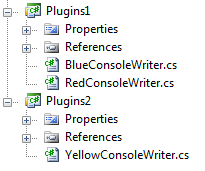
Inside of our console app’s directory we are going to create a plugins folder. We will be able to place dlls in this folder and MEF will retrieve exports from these dlls automatically. First I am going to create a host class to run all of our code from:
[Export(typeof(ConsoleWriterHost))]
public class ConsoleWriterHost
{
    [Import]
    public IEnumerable<IConsoleWriter> ConsoleWriters { get; set; }

    public void Run()
    {
        foreach (IConsoleWriter consoleWriter in ConsoleWriters)
        {
            consoleWriter.Write("Hello from the console!");
        }
    }
}
Now that we have this host which imports our “IConsoleWriter”s and exports itself, we can fire up our application like this:
public static void Main(string[] args)
{
    var catalogs = new ComposablePartCatalog[]
                       {
                           new AttributedAssemblyPartCatalog(Assembly.GetExecutingAssembly()),
                           new DirectoryPartCatalog(@".\plugins", true)
                       };

    var catalog = new AggregatingComposablePartCatalog(catalogs);
    var container = new CompositionContainer(catalog);
    container.Compose();

    var consoleWriterHost = container.GetExportedObject<ConsoleWriterHost>();
    consoleWriterHost.Run();
}
In this code we are declaring two part catalogs in an array. One is an “AttributedAssemblyPartCatalog” which will allow us to gather up the Exports from the current dll (which is the ConsoleWriterHost) and then second is a “DirectoryPartCatalog” which points at the “plugins” folder and gets our exports.
We then pass these catalogs into an “AggregatingComposablePartCatalog” which is a catalog that simply takes in multiple other catalogs. We then pass it into the “CompositionCatalog” and call “Compose” just as we always do. After that we call the “GetExportedObject” method on the container to request the ConsoleWriterHost and then run it. Depending on what dlls we have in the plugins directory, we will get a different number of “IConsoleWriter”s. If we have these dlls in the folder:

Then we will get this output:
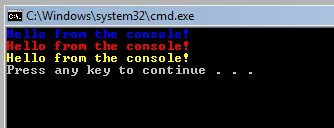
Now that you have seen how to get exports from external dlls, I hope you can start to see a little bit of the cool features that MEF has to offer you. In the next entry we are going to look at export lifetimes and see how we can have our imports get updated whenever we drop new dlls in the folder.
Loved the article? Hated it? Didn’t even read it?
We’d love to hear from you.



One thing that came up in my mind when I saw that DirectoryPartCatalog – what about security 🙂
Does MEF offer any automated ways to check the assemblies in the plugin folder or we must write some custom logic ?
@Ivan MEF handles the enumerations of files in the folder (and gathers up the exports), but your process must have rights to access to that folder. I’m honestly not really sure what your question is.
Ok, I didn’t make myself clear enough. What if somebody inject their own assemblies in the folder, then he/she will be able to intercept all calls.
Yep, MEF simply loads the dlls from a particular folder. I think the idea is that any plugins which are dropped in that folder will be automatically loaded. I’ll have to look and see what hooks MEF provides for checking plugin assemblies before loading them.
Justin,
Why does the collection of plugins need to be in the ConsoleWriterHost class? Is this required by MEF? Why can’t the collection be in your main class.
It’s unnecessarily complicating the Compose method, which already smells bad.
@Robert Nope, it doesn’t. You could have it on the "Program" class, but then you need to instantiate the class and add it to the catalog so that MEF can "inject" dependencies into it.