

I don’t know about most of you out there, but I know that I am extremely excited about the impending release of ASP.NET MVC. I’m even more curious though about what kind of adoption we are going to start seeing out of the gate, especially being that companies have invested so much money in developers learning ASP.NET Web Forms. There is one thing that could stand in the way of adoption, and that is horror stories coming from early adopters about security issues or flaws in production web applications that were overlooked because developers didn’t have to think as much about these kinds of issues in ASP.NET Web Forms.
Most of these issues revolve around escaping output that is going into the HTML and dealing with post data manually. Something that I have been looking at recently is the model binding abilities that ASP.NET MVC provides us. In case you aren’t familiar with what I am talking about, it is now possible to tell ASP.NET to bind a class on an action method using a default model binder. So let’s say we have a controller action with a signature like this:
[AcceptVerbs("POST")]
public ActionResult Edit(Product product)
How does ASP.NET MVC know what to do with the post data that is coming to this method? Well, it uses the default model binder and it tries to bind any post data that matches the patters of “parameterName.PropertyName”. So if on my form I have a field called “product.Name” then ASP.NET MVC will bind the value of this field to the product class that is coming into the “Edit” action. It just so happens that this is both convenient and very dangerous.
The problems come in when you consider the idea of post data tampering. What if I created a form to update my product that only had the ability to edit the Name, Price, and a few other attributes of the product? And let’s say that I am a malicious person who loves tools like the “Tamper Data” Firefox plugin. Which is actually quite the useful tool for development.
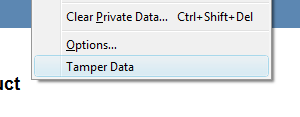
The first thing that we will do is to fire up “Tamper Data”.
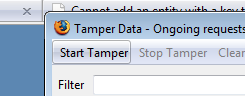
Then we will tell it to start tampering:
Now, when we post back the form, we get this nice little form that looks like this:
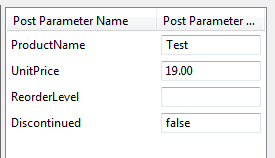
And we can right click and add a new item. So what would happen if we added an item like this?
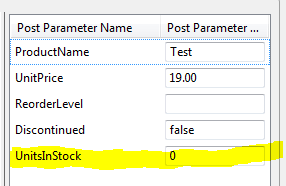
Hmmmm. Of course ASP.NET MVC has no way to know that you don’t want this property updated, and it also has no way of knowing that the post data is invalid. Remember, we don’t have any viewstate, or serverside state of any kind that would let us know what fields are posting back from the form.
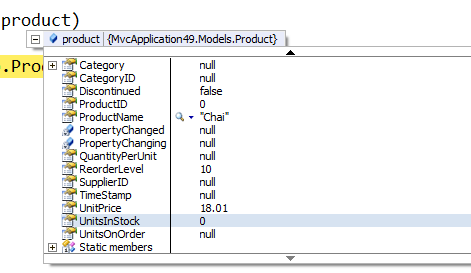
This is a pretty major problem if you are just blindly binding data on the server side. So, what do you do? Well, there are a few options actually.
The first, and probably most obvious is to just pull the data yourself and copy it to your object:
[AcceptVerbs("POST")]
public ActionResult Edit(FormCollection form)
This is pretty inefficient, but you get complete control. As you see above, if you put a “FormCollection” object in the parameter list then ASP.NET MVC will bind the requests form collection to it. The second method is to use “UpdateModel”:
UpdateModel(product, new[] { "ProductName", "UnitPrice", "Discontinued", "ReorderLevel" });
Here we are calling the UpdateModel method on the controller, and we are passing in a list of properties to bind instead of just letting it bind everything. In order to do this, we would just retreive the product from the database and let this method update it, or create a new product and pass it into this method. You wouldn’t have the Product class itself in the parameters to the action.
Another option would be to create interfaces for the properties that you want updated, and then call “UpdateModel” using an instance of the interface instead of the class type, this way you would only get the correct properties bound, without the risk of binding properties that you don’t want.
You could also create your own model binder for products that would only bind the properties that you wanted. This is a bit more limiting though, since you would either have to specify the model binder globally (which means you can’t limit which properties are bound differently in different places) or you have to specify the model binder using attributes on every action parameter that uses the class. Talk about ugly!
If you wanted to bind globally, you could do this in the global.asax:
ModelBinders.Binders[typeof(Product)] = new ProductBinder();
Otherwise it’ll look like this:
[AcceptVerbs("POST")]
public ActionResult Edit([ModelBinder(typeof(ProductBinder))] Product product)
A final option is one that was suggested to me by Simone Chiaretta (who referenced Jeremy Miller’s work) is to create a presentation only model. This way you could define a presentation model which allowed you to only bind the properties you needed. This would still be an issue though if you were looking to bind different properties from different forms, you would still have to exploit one of the methods above.
Update: Sorry, I left off one of the most obvious ways of accomplishing this as well, just putting parameters on the action that match the name of the fields on the form. So, if we had “ProductName” and “UnitPrice” we would have an action that looked like this:
[AcceptVerbs("POST")]
public ActionResult Edit(string ProductName, string UnitPrice)
This way we can just parse out the individual items instead of using the “FormCollection”.
If you have any other suggestions on ways to accomplish this, please let me know! I’m looking for ideas, links, etc… I would really love to see ASP.NET MVC succeed, and educating the public on ways to avoid some of these pitfalls is one way that we can do this. If you have a blog, and work with ASP.NET MVC, I encourage you to get the word out there regarding the new pitfalls that ASP.NET developers will face when moving to MVC.
Loved the article? Hated it? Didn’t even read it?
We’d love to hear from you.



Very interesting, and very scary indeed.
There should be a solution OTOB for it, one can’t count that people will know and/or remember to workaround this flaw of the binding model.
I wonder how other, more seasoned MVC frameworks (MonoRail, Django etc) handle this? Did they find a good solution?
I agree with Lerxst and how DO the other frameworks deal with this? It should be a common problem across the board, no?
@Lerxst Most of the other frameworks have this problem as well. In Ruby on Rails they have an update_attributes method on the model that does this exact same thing. And you will run into the same issues if you use it. They have methods called attr_accessible and attr_protected, but these methods are used in the model.
The issue here is that ASP.NET MVC does not prescribe a particular model for you to use. You can use Linq to Sql, Linq to Entities, etc… So there isn’t a good way for this to be implemented in an automated fashion.
One thing you can do is have your model object inherit from an interface and use UpdateModel<IProduct>. In this case it would only populate fields of IProduct and not others. You can also add the Bind attribute to the model itself and exclude certain properties.
You could also use the Bind attribute to whitelist (or blacklist) properties of the model object.
[AcceptVerbs(HttpVerbs.Post)]
public ActionResult Edit([Bind(Include="ProductName, UnitPrice, Discontinued, ReorderLevel")]Product product) {…}
If you don’t like while/black list, you can also use a Interface that contains the list of properties you want auto-bound to the model.
With Java Struts you have a presentation model (called Form) per each view, and it is used both for binding and for passing data to the view.
This forces you to think about what you send to the view, and not re-use the objecs that comes from the model.
Thanks guys, all great suggestions! I’ll add a few to the post when I get a chance.
I’ve run across this and wondered in my code if this meant my model should really be some other type. In the above example, it’s not a Product you’re submitting from the view, it’s a ProductUpdateCommand, which has only the name and price. One downside of this approach, though, is a model class explosion, so I’m really waiting to see more guidance on this.
@Daniel I really like Chad’s suggestion of using UpdateModel<IProductBound>(product). Simone actually suggested that to me earlier, but I didn’t quite get what he was saying.
@Haacked Yeah, I think the blacklist/whitelist in the "Bind" attribute, being that it is on a parameters, is really really ugly and hard to read IMO. I appreciate the suggestion though, always good to see a PM comments on their product. Thanks!
@Justin: yep.. Chad suggestion is what I was saying 🙂
to answer to Daniel question:
You have a Product class
You have many operations that work on it
UpdateProduct
NewProduct
ChangeUnitInStock
You don’t need to create many classes, but just one class, and then have it implement the various interfaces
IProductUpdate {
Name {get; set;}
Price {get; set;}
}
IProductNew {
Name {get; set;}
Price {get; set;}
Discounted {get; set;}
}
IChangeUnitInStock {
UnitInStock {get; set;}
}
And then you Product
Product: IChan geUnitInStock, IProductNew, IProductUpdate{
Name {get; set;}
Price {get; set;}
Discounted {get; set;}
UnitInStock {get; set;}
}
And then each of your Actions Binds to one of these interfaces, and not to the full object, and you don’t have to rely on the white/black list.
Daniel and Simone are describing the exact technique we used on our last MVC project. It solves a lot of problems and makes development so, so easy…
Cool technique, Simone. Today I was listening to "Uncle" Bob Martin talking to Scott Hanselman about SOLID, wouldn’t the sample above be an example of Interface Segregation, the "I" in SOLID? Or am I mixing things up?
@Lerxst:
Here the purpose is a little bit different, but in a sense, it can be seen as that principle.
mate, I am really grateful with all the tutorials that you posted here. I am able to successfully create a simple mvc site with asphostcentral.com and everything works great.
Initially, there was some hiccups in setting up the site, but I realized that the mvc dll files have not been included yet. Now, I resove everything.
I look forward to your next articles about MVC. Great work!
Thanks !
Well, to solve this problem, probably easier solution is to bind data to your object, so user can not modify them, like you suggested in one of your solutions for this problem.
Great post ….. Thanks…
@Simone
I like your solution.
Let me ask you this:
How to do you send the View Model to the service after binding it?
I mean, you instantiate a business Model and fill it in with the View Model’s properties? How do you do it? What do you propose?
If the view model implements the same interface that the business model does, what I don’t like is that you need to declare public setters in your model (or interface actually). Sometimes I want to have some properties instantiated by constructor.
Thank you!
I prefer using ‘UpdateModel’ function 🙂
The more you want to make these infrastructures secure, the more complicated your code becomes. This is why I’d love to be as imperative as possible. What I do, is to extract information, not even from FormCollection, but from Request object, at the most fundamental level. Using this method, I’ve never encountered any kind of form spoofing attack (as you called tampering). And of course, I agree that I have to write more code.
To prevent unexpected binding to your model classed you may just mark important properties “set” accessor as non-public. It may be private or internal – doesn’t matter. You set this properties only in your business layer and ModelBinder could never set them from POST values.
I think it’s more elegant solution than white/black lists and also follows DDD way.
Great article! I am an experienced web developer but fairly new to MVC, so this is great stuff to know. And thanks to all the contributing comments that were made. I like the idea of having interfaces that expose only the properties expected. However at a more rudimentary level, Saeed’s point is true, just using the good ol’ fashion Request would do the job.
Can’t we use View Model, where we can have full control over validation and keeping just required field and then collecting values from view models and passing it to Repositories..In this way we can mix up properties even from multiple forms.
Another option would be to create interfaces for the properties that you want updated, and then call “UpdateModel” using an instance of the interface instead of the class type, this way you would only get the correct properties bound, without the risk of binding properties that you don’t want.
Can someone please provide me a code sample for this?
Your help is much appreciated!!!
Is it something like this..
public ActionResult Edit(IProductUpdate product)
Hey mate. Thanks for this. this is very useful as have been struggling to understand ModelBinder recently. The update have become very important. I did not know how an action reads data from a View 🙂 Cheers!
Great discussion here in comments happened. @Simone this one way of Action binding to interface is clear. Ty. for example. 🙂