

If the title of this post confused you, then you really need to continue reading. There is a technology naming snafu that occurred in the .NET 3.5 release that to this day is still causing serious confusion. I am here to hopefully help people sort out this confusion, and so that we can all move on with our lives. In the .NET 3.5 release Microsoft included a very cool technology called LINQ (Language Integrated Query) and they also release an ORM (Object Relational Mapper) called LINQ to SQL. Thanks to the clever naming of this new ORM, generations of developers will be confused for many years to come.
I think the problem really lies in the fact that the LINQ query syntax looks a lot like SQL, and so people automatically associate it with SQL. Then you throw LINQ to SQL into the mix and people say "hey! This cool LINQ thing lets me query my database in C# code. Neat!" And there you have it, in their mind now, LINQ = LINQ to SQL. And this whole thing could have been avoided, but unfortunately LINQ to SQL is a fairly expressive name (and it fit into their fancy naming scheme), and the guys writing it never really thought that it would create mass confusion. I probably wouldn’t have realized this either. Okay okay, I definitely would not have realized it.
So if LINQ isn’t a way to query a database, what is it? LINQ is a library for performing set-based query logic across a variety of data sources. In fact, LINQ is just the name for the overarching technology, but providers have to be written for each data source that you are going to be querying against. One of the providers that Microsoft gave us is called "LINQ to Objects" and it is a provider which executes LINQ queries against in-memory objects.
LINQ to Objects
This whole thing is much easier to explain with a few examples, so I’ll illustrate the point. Let’s say that we have a list of people in a list:
var people = new List<Person>
    {
      new Person {FirstName = "Justin", LastName = "Etheredge"},
      new Person {FirstName = "Bob", LastName = "Smith"},
      new Person {FirstName = "Juan", LastName = "Valdez"}
    };
And if we want to query over this list to find a list of all people whose first names start with "J", then all we need to do is pass a lambda that takes a Person and then does a check to see if the FirstName property starts with "J":
var result = people.Where(p => p.FirstName.StartsWith("J")).ToList();
Cool, so this simple LINQ query uses the extension methods that Linq provides, but I could rewrite this in the query syntax like this:
var result = (from p in people where p.FirstName.StartsWith("J") select p).ToList();
Neato. Now that LINQ query looks a bit like SQL, but they just borrowed the syntax because SQL was already a standard language for performing set based query operations. They wanted it to look and feel familiar since most developers use SQL quite regularly. But at this point, we are clearly not doing anything with a database!
What is occurring here is that we are writing code that loops through each item in the list and then executes our lambda over each item. In fact, what will execute in this case is essentially this code:
public static IEnumerable<Person> GetPeople(IEnumerable<Person> people, Func<Person,bool> predicate)
{
  foreach (Person person in people)
  {
    if (predicate(person))
    {
      yield return person;
    }
  }
}
Now that is using a wee bit of advanced C#, but nothing too bad. (If yield looks weird to you, check out this post) Here we are just passing a list of people and a Func delegate that takes a person and returns a boolean into the "GetPeople" method. Then we loop through each person and if the Func delegate returns true, then we return that person to the calling code. Simple! We could run it like this:
var result = GetPeople(people, p => p.FirstName.StartsWith("J"));
Very simple, so you can see that we can emulate this behavior (LINQ to Objects is not performing any magic), and we can use LINQ without a database.
So, the code that we looked at above was specifically LINQ to Objects. So, to reiterate, LINQ to Objects is just the library which just executes code against in-memory objects. Just like our "GetPeople" method above, only the LINQ "Where" method might look a bit more generic like this:
public static IEnumerable<T> Where<T>(IEnumerable<T> list, Func<T,bool> predicate)
{
  foreach (T item in list)
  {
    if (predicate(item))
    {
      yield return item;
    }
  }
}
So if the LINQ to Objects provider executes the LINQ queries directly against objects, then how do we create SQL that fires against the database? Good question! And this is another one of the major sources of confusion among developers. LINQ to Objects just executes code to perform all of the different LINQ operations, but the rest of the LINQ providers operate completely differently. And I mean completely.
In the above example we pass in a delegate (the lambda) that takes in an item and returns a boolean, and the LINQ to Objects "WHERE" method expects just that, a Func<T,bool>. It then directly executes that delegate just as we did in our version of the "Where" method. If the LINQ to SQL provider did the same thing, then how would it ever turn that delegate into a SQL query? The short answer is that it couldn’t. Clearly LINQ to SQL must have some way to look at a predicate that we are passing in and parse it in order to understand what the query is trying to do. Then it must be able to map whatever operation we are performing into SQL. But in the examples above, we are passing compiled delegates to the method, and there really is very little we can do with them.
In Steps Expression<T>
If you look at the signature of the "Where" method for Linq to Objects it looks like this:
System.Linq.Enumerable.Where<TSource>(this IEnumerable<TSource>, Func<TSource,bool>)
If you look at the signature of the "Where" method for Linq to Sql (or really most of the other LINQ providers), it looks like this:
System.Linq.Queryable.Where<TSource>(this IQueryable<TSource>, Expression<Func<TSource,bool>>)
Do you see the subtle difference? First we are operating on Queryable and IQueryable. These are the interfaces in LINQ which represent a LINQ data source which we can run LINQ queries against. LINQ to Objects doesn’t really require this, since we are just executing code directly against a list. What is important to notice is that our "Func<TSource,bool>" is now wrapped inside of "Expression<>".
So what does wrapping a delegate in Expression do? It has vast implications for what the C# compiler does with the lambda which is being passed into it. When the C# compiler sees Expression<>, instead of turning the lambda into an executable piece of code, it turns it into an expression tree. And expression tree is a data structure which represents the code itself, and not the compiled code. The tree will hold all of the information about parameters, variables, classes, method calls, property accesses, etc… This tree can then be traversed in order to understand what actions the original code was trying to perform.
So outside of the context of LINQ, if we did this then we could get an executable delegate:
Func<Person, bool> func = p => p.FirstName.StartsWith("J");
But if we did this, then we would end up with an expression tree instead!
Expression<Func<Person, bool>> func = p => p.FirstName.StartsWith("J");
Yep! You read that right. Based on the type that we are assigning to, the C# compiler will do something different with the lambda on the right. The above lambda will produce an expression tree that looks like this:
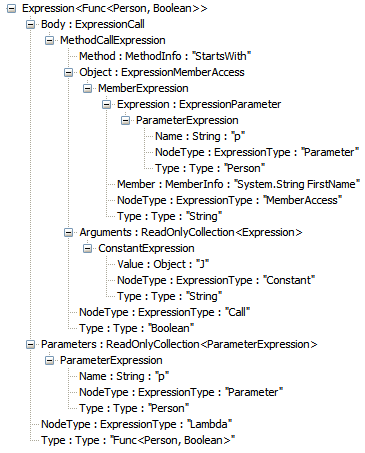
If you look closely you will see the MethodCallExpression that is calling "StartsWith" and you can see the parameters along with the MemberAccess for the "FirstName" property. Even the info about the lambda itself is tucked inside of this tree. Now this tree is passed to LINQ to SQL (or any other LINQ provider) where it will be walked, and then the appropriate actions will be performed. In this case, the LINQ to SQL provider is specifically aware of the String.StartsWith method and it knows that this can be translated into a "WHERE FirstName LIKE ‘J%’" query.
Now this is not an easy process to walk this tree and parse out all of the info needed in order to build a query. Like I said earlier, LINQ to SQL knows specifically about the String.StartsWith method and so it is able to translate this for your query. It also knows about a handful of other String methods like "Contains" and "EndsWith". You can’t just call any method though, because if you do and Linq To Sql can’t translate it, then you’ll get an error. In some instances you’ll get something even weirder happen, which is that your provider may query back what it understands and can translate, but then run other methods in-memory. This may cause you to pull back way too much data, and it something that you need to be careful with.
Parade of Providers
I keep mentioning other providers for LINQ but then I haven’t really brought up any of them. Well, there is LINQ to SQL (which we have been talking about), LINQ to XML (which allows you to query over XML data), Entity Framework (another ORM from Microsoft that has a LINQ provider), NHibernate (has a LINQ provider available), LINQ to DataSets (which allows you to run a LINQ query against an in-memory dataset)… pretty much anywhere that a set based query approach could work. There is even someone who implemented a provider for LINQ to Flickr for querying back pictures! As long as you can translate the expression trees passed to the provider, and figure out what to do, you can implement a LINQ provider for it.
Wrap-up
You may still be a bit confused, and that is okay. But just remember that LINQ is the overall technology including the standard set of query methods and the query syntax. In order to use LINQ you must have a provider, and those providers can either execute the code you give them directly, or they can use expression trees to parse the intent of your code and then execute operations which mimic your intent. LINQ really is an amazing piece of technology, and one that will become a standard part of your tool belt as soon as you become familiar with it.
Loved the article? Hated it? Didn’t even read it?
We’d love to hear from you.



Kind of unrelated to the main topic of the post: but what are you using to visualize the Expression Tree?
It is just the sample expression tree visualizer that ships with VS2008. In the C:Program FilesMicrosoft Visual Studio 9.0Samples1033 folder there is a CSharpSamples.zip file and in that zip there is a LinqSamplesExpressionTreeVisualizer. I am using that visualizer. Just build that project and dump it in your My DocumentsVisual Studio 2008Visualizers folder, then restart Visual Studio. Done! Then inside visual studio you can right click the variable and view it using the visualizer. Works great. It might be included automatically in VS2008 SP1, I honestly don’t remember.
Hi, this is a perfect explanation of the basics of expression trees in LINQ. I have read books on LINQ by Charlie Calvert and another one by Joseph Rattz (which are actually very good) and I think that your explenation is the clearest. You are a genious when it comes to writing about .NET programming. Write a book; I will be the first one to buy it.
@Przemek Thanks! Now I’ll just have to find a topic to write about 🙂 In reality though, I have no time to write a book, I’m too busy writing on my blog!
"NHibernate (has a LINQ provider available)"
Where? You mean the one which can do where/select and that’s it? Or the one which isn’t finished yet?
besides that, good article. There’s too much confusion about what linq is and although I don’t have the illusion it will make the confusion go away, it’s a good thing that the difference between what Linq in theory means and what the usage of it means is made more clear. Your article definitely makes it easier to understand what linq is and what linq to * means
@Frans Yep, the NHibernate LINQ provider is not complete. I apologize for the confusion. I was also under the impression that NHibernate 2.1 was supposed to have a LINQ provider, but it looks like that has been delayed until the next version. Thanks.
Great topic and great post Justin!
right now I’m working on DDD and we’re now implementing linq based infrastructure/database abstraction layer and last few days I went through some serious ‘uhmmmm..’s while learning this stuff, and damn I wish you finished this post 2 days ago! 😉
I think the biggest difference between different providers is, apart from the way they handle expressions – the way they execute them, I like the fact that linq2sql Provider’s CreateQuery returns the IQueryable that may represent the actual data fetched from sql or just the tsql statement to be silently executed when you call Sum, Max, ToList etc. What I dont like though is the fact that it returns an IQueryable that will break in runtime on this :
using (DataClasses1DataContext dt = new DataClasses1DataContext())
{
IQueryable<Member> members = from m in dt.Members select m;
// Ooops, cant call elementat on THIS particular
// iqueryable.
var m1 = members.ElementAt(0);
}
but this, will work fine :
using (DataClasses1DataContext dt = new DataClasses1DataContext())
{
IQueryable<Member> members = (from m in dt.Members select m).ToList().AsQueryable();
var m2 = members.ElementAt(0);
}
Maybe its me, but I find it a bit smelly to return an iqueryable implementation that will always throw an exception while running ElementAt, Reverse etc. and I dont get why it cant silently fetch the data like it does in case of aggregate functions.
Its a small thing I agree, but made us decide to always return IEnumerable instead of IQueryable from the IDatabase to higher abstractions.
Great Article as always.
Nice post, Justin. I personally preferred with LINQ to SQL was called DLINQ and LINQ to XML was called XLINQ. The names made it clear that the technologies were LINQ related but derivative in nature. As they say, marketing is way too important to leave to the marketing people. 🙂
@Kevin Honestly I had forgotten about the old names, but yeah, I think DLinq probably would have been a bit better.
You hit the nail with this post, definitely cleared a lot of stuff for me…and couldn’t agree more with the "generations of developers will be confused for many years to come", due to the name.
Thanks for all the useful posts Justin. Keep it up!
Just marked your feed for followup.
I haven’t had a need for LINQ to SQL but the whole LINQ tech is great. Link to XML makes working with XML so relatively easy it’s, well…just great.
BTW Justin, Przemek’s suggestion about writing a book should be given some thought! If you’re interested I’ll send you a PDF about how to get published on Amazon. It’s easier than 99% of people would think.
On a side note, I’d like to vote that you shave your head completely. You’ll look younger and cooler. But hey, it’s a bit off topic. 🙂