

In the soon-to-be-released .NET 4.0 framework and Visual Studio 2010 we are going to get a plethora of new tools to help us write better multi-threaded applications. One of these tools is a new namespace within the System.Threading namespace which is called "Tasks". The Tasks in System.Threading.Tasks namespace are a method of fine grained parallelism, similar to creating and using threads, but they have a few key differences.
The main difference is that Tasks in .NET 4.0 don’t actually correlate to a new thread, they are executed on the new thread pool that is being shipped in .NET 4.0. So, creating a new task is similar to what we did in .NET 2.0 when we said:
ThreadPool.QueueUserWorkItem(_ => DoSomeWork());
Okay, so if all we are doing is just plopping a new task on the thread pool, then why do we need this new Task namespace? Well, I’m glad you asked! In previous versions of .NET, when we put an item on the thread pool, we had a very hard time getting any information back about what exactly was going on with the piece of work that we had just queued. For example, in the code above, what would we have had to do in order to wait on that piece of work to finish? The thread pool doesn’t give us any built-in way to do this, it is just fire and forget.
In order to wait, we could have done something like this:
var mre = new ManualResetEvent(false);
ThreadPool.QueueUserWorkItem(_ => {
    DoSomeWork();
    mre.Set();
});
mre.WaitOne();
But that is just a tad bit ugly. And what if we wanted to specify some piece of code that would execute directly after that queued work, and then would use the result? Or what if we wanted to fire off a few pieces of work and then wait for all of them to finish before continuing? Or what if we only wanted to wait for just one of them to finish? What if we wanted to return some value from the piece of work, but block if the result was requested before it was available? What about all of those things? A bit daunting, right? Well, all of this functionality is exactly why Tasks in .NET 4.0 exist!
Creating Tasks
Let’s look at how we could create one of these tasks:
Task.Factory.StartNew(() => DoSomeWork());
Hey, that is pretty simple, and it doesn’t look too far removed from throwing items on the thread pool! In fact, when we execute this line, we really are just dropping a task on the thread pool because we aren’t getting a reference to the task so that we can use it’s extra functionality! To do this, we could simply assign the result to a variable:
var task = Task.Factory.StartNew(() => DoSomeWork());
This way we now have a reference to the task.
So, how is this different from creating a thread again? Well, one of the first advantages of using Tasks over Threads is that it becomes easier to guarantee that you are going to maximize the performance of your application on any given system. For example, if I am going to fire off multiple threads that are all going to be doing heavy CPU bound work, then on a single core machine we are likely to cause the work to take significantly longer. You see, threading has overhead, and if you are trying to execute more CPU bound threads on a machine than you have available cores for them to run, then you can possibly run into problems. Each time that the CPU has to switch from thread to thread causes a bit of overhead, and if you have many threads running at once, then this switching can happen quite often causing the work to take longer than if it had just been executed synchronously. This diagram might help spell that out for you a bit better:
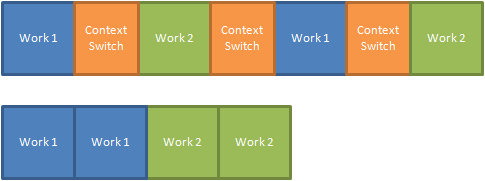
As you can see, if we aren’t switching between pieces of work, then we don’t have the context switches between threads. So, the total cumulative time to process in that manner is much longer, even though the same amount of work was done. If these were being processed by two different cores, then we could simply execute them on two cores, and the two sets of work would get executed simultaneously, providing the highest possible efficiency.
Because of this fact, Tasks (or more accurately the thread pool) automatically try to optimize for the number of cores available on your box. However, this is not always the case, sometimes you will fire off threads that will perform actions which require a large amount of waiting. Something like calling a web service, firing off a database query, or simply waiting for some other long running process. With this sort of workload we probably want to execute more than one thread per core. Think about that, if we had 10 different urls that we wanted to download a web page from, we probably don’t want to just fire off two at a time on a dual core machine. Since downloading a file from the web isn’t very CPU intensive, we probably want to go ahead and fire all of them off at once so that we gain as much as we can from parallel execution. If this was the case, the above task would be executed like this:
Task.Factory.StartNew(() => DoSomeWork(), TaskCreationOptions.LongRunning);
Again, very easy, all we have to do is tell the task factory that this is a long running task, and it will use a different heuristic to determine how many threads to execute the tasks on.
Waiting On Tasks
Earlier I said that one of the nice features of Tasks was the ability to wait on them easily. In order to do this it is merely a one liner:
var task = Task.Factory.StartNew(() => DoSomeWork());
task.Wait();
The task will be queued up on the thread pool, and the call to "Wait" will block until it’s execution is complete. What if we had multiple tasks and we need to wait on all of them. Again, it is a simple one liner:
var task1 = Task.Factory.StartNew(() => DoSomeWork());
var task2 = Task.Factory.StartNew(() => DoSomeWork());
var task3 = Task.Factory.StartNew(() => DoSomeWork());
Task.WaitAll(task1, task2, task3);
That sure was hard. And what if we had multiple tasks, and we just wanted to wait for one of them to complete, but we didn’t care which one… yup, you guessed it, another one-liner:
var task1 = Task.Factory.StartNew(() => DoSomeWork());
var task2 = Task.Factory.StartNew(() => DoSomeWork());
var task3 = Task.Factory.StartNew(() => DoSomeWork());
Task.WaitAny(task1, task2, task3);
Again, this task is made very easy by the Task APIs. Earlier I also mentioned something about being able to have a task produce a value, and then block until this value is produced. Well, first we have to look at how we create a task which returns a value. To test this functionality, let’s go ahead and create a task that looks like this:
var task = Task.Factory.StartNew(() =>
{
    Thread.Sleep(3000);
    return "dummy value";
});
This task is just going to wait a few seconds then return a dummy value. Because the lambda is now returning a value, it is going to use the overload of "StartNew" that takes a Func<T> instead of an Action. So, the task that is produced is now a Task<T> instead of just a Task. The generic parameter T specifies what the type of the result is going to be. The Task<T> type has a property on it called "Result" which will block when we access it. So if we executed the following code, then it would run without incident:
var task = Task.Factory.StartNew(() =>
{
    Thread.Sleep(3000);
    return "dummy value";
});
Console.WriteLine(task.Result);
This quite useful! The task is going to execute on a separate thread, and will take 3 seconds. When we call Console.WriteLine though, we won’t get an exception because the value is not there, we will simply block and wait until the value is available before continuing on. This can be exceedingly useful when used in conjunction with the long running tasks, since it easily allows us to execute a large number of long running operations and then just ask for their results, knowing that they will simply block until the operations are complete.
Tasks And Continuations
Another really cool feature of Tasks in .NET 4.0 is the ability to create continuations. By this I mean that we can execute a task or a number of tasks and then have a task which will execute after their completion, and even be able to use the result of their execution! It provides a very easy mechanism of coordinating complex thread behaviors.
Let’s say in the example above, instead of calling "Result" and waiting for it to finish, I could have used a continuation in order to write the value to the console on a separate thread when the task was done executing. In this case, I would not have had any blocking at all, the application would have continued executing, but when the 3 seconds was up, the continuation would be executed and the value would have been written out to the console. The code would look like this:
Task.Factory.StartNew(() =>
{
    Thread.Sleep(3000);
    return "dummy value";
}).ContinueWith(task => Console.WriteLine(task.Result));
Very powerful. In the example above we are creating the continuation inline, but we could add it on a second line as well:
var task = Task.Factory.StartNew(() =>
{
    Thread.Sleep(3000);
    return "dummy value";
});
task.ContinueWith(t => Console.WriteLine(t.Result));
We can also do more than just a single continuation, we can chain on any number of continuations:
Task.Factory.StartNew(() =>
{
    Thread.Sleep(3000);
    return "dummy value";
})
.ContinueWith(t => Console.WriteLine(t.Result))
.ContinueWith(t => Console.WriteLine("We are done!"));
Continuations provide us with much more rich behavior such as specifying that they should only be executed when an error occurs, when cancellation occurs, we can say that the continuation is long running, we can specify that it is executed on the same thread as its parent, etc… There is a lot there, and I encourage you to explore all of the overloads on the "ContinueWith" method.
Not only can we perform a continuation on a single task, but we can use static methods on the Task class to allow us to perform continuations on a set of tasks:
var task1 = Task.Factory.StartNew(() =>
{
    Thread.Sleep(3000);
    return "dummy value 1";
});

var task2 = Task.Factory.StartNew(() =>
{
    Thread.Sleep(3000);
    return "dummy value 2";
});

var task3 = Task.Factory.StartNew(() =>
{
    Thread.Sleep(3000);
    return "dummy value 3";
});

Task.Factory.ContinueWhenAll(new[] { task1, task2, task3 }, tasks =>
{
    foreach (Task<string> task in tasks)
    {
        Console.WriteLine(task.Result);
    }
});
This way, all tasks will finish, and then we can use each of their results. ContinueWhenAll doesn’t block at all, so you might need to add a call to "Wait()" at the end if you are executing inside of a console application.
Summary
This has only been a very light introduction to all of the features that the System.Threading.Tasks namespace gives you in .NET 4.0, but I hope that it has piqued your interest enough that you will want to go spend some time exploring it! Enjoy!
Loved the article? Hated it? Didn’t even read it?
We’d love to hear from you.



This indeed looks like a great set of APIs. Interesting that I’ve only just head about it now. Did you happen to have any other good resources while researching this post, or mainly digging around with IntelliSense?
@Matt I wish I could answer your question. I’ve done a few presentations on all of the parallel stuff in .NET 4.0, so I couldn’t even begin to tell you where all of the info came from. Mostly MSDN and Daniel Moth’s blog (http://www.danielmoth.com/Blog/).
Good article. Thanks
Great stuff! One question – when obtaining return values from a Task, does it marshal the call back to the main thread automagically, similar to the BackgroundWorker?
Crystal clear!
Thanks a lot for the explanations!
@Neil I’m assuming that you are talking about the result from the Task execution being available on the UI thread. Well, as long as the Task was created in the UI thread, then the result will be on the same thread as the reference to the task.
The tasks themselves cannot access controls from the UI thread directly though, this still requires that they be marshalled.
Great article, thanks for the clear explanation!
Very excited to work with Tasks, can’t describe how much cleaner code is looking
How do you control how many parallel threads to be working at all time? back to your example of fetching web pages, let’s say you have 1000 page to fetch, there should be a way to queue only 10 threads to work at the same time, and once 1 spot frees up, you add another Task.
From what I understand, is that you queue all of them , yes the 1000 pages (as tasks), and .net will take care of determining how many to run in parallel, but what if you have a beefy machine and .net decide to fetch 500 in parallel? which is not polite on the web server you are hitting…
Hi Justin,
I tried something similar to the example with Thread.Sleep(3000) in my own code. But when I use Thread.Sleep the UI thread gets blocked! It works fine when I do a heavy algorithm, but Thread.Sleep blocks the entire application even from within a Task.
Can you explain why this is the case?
@Stefan It is hard to say without looking at the code. What kind of project is it? WinForms? Silverlight?
Hi Justin,
Ah sorry, it’s a WinForms application that interacts with hardware for testing lenses. The hardware rotates a lens, then measures the light intensity at that angle, and repeats this for an entire list of angles. Because of the hardware design I have to constantly poll for the position, which I wanted to do in a background thread. I intended to use chained tasks and hide all the threading, etc. in a class behind methods and events.
Since I posted the question, I decided that Thread.Sleep behaviour wasn’t really important. So I tried using a heavy algorithm instead. This works fine when doing parallel tasks, but my tasks have to work in series (position, measure, position, measure, …). But when I chain them the UI still blocks, even without using Thread.Sleep :-S
see http://stackoverflow.com/questions/3367895/net-why-does-threading-task-task-still-block-my-ui for a simplified code example of what I’m trying to do.
very good write-up…a great introduction for beginners…thanks!
Hi , am looking for parallel crawler using new API in .net 4 . I started with http://www.codeproject.com/KB/IP/Crawler.aspx
but this is a multi – threaded how can make my own Parallel Crawler ?
Great article !!! Clear and simple, it was just what I was looking for. It really helped me for the project that I’m working on
Thanks for that. Clear and easy to understand. Tons of help. Appreciate it.
Very usefull Article..thanks a lot buddy…
I don’t understand the sentence: “The main difference is that Tasks in .NET 4.0 don’t actually correlate to a new thread, they are executed on the new thread pool that is being shipped in .NET 4.0”
Can you explain it clearly?
@An Bing Trong When you create a task, you are not creating a new thread. You are putting a task onto a queue, and then there is a pool of threads (a “thread pool”) that has a bunch of threads already created that will run the task.
The reason this is done is that creating threads is *relatively* expensive, so by creating a number ahead of time, and then scaling up the pool as needed, you can get much better performance than creating and destroying new threads for every task.
The Thread pool that “Tasks” uses will it be shared or will it be a new dedicated Thread Pool for “Tasks”?
I m asking because
The thread pool can only run so many jobs at once, and some framework classes use it internally, so you don’t want to block it with a lot of tasks which need to block for other things.
In general, you should create a new thread “manually” for long-running tasks, and use the thread pool only for brief jobs.
There were two main ways of multi-threading which .NET encourages: starting your own threads with ThreadStart delegates, and using the ThreadPool class either directly (using ThreadPool.QueueUserWorkItem) or indirectly using asynchronous methods (such as Stream.BeginRead, or calling BeginInvoke on any delegate).
very clean way to do parallel processing.. well explained.. Thanks
This is a fabulous article. Very clear and concise with some nice recommendations for further development. Thanks so much!
Nice, Simple and clean explanation like the code!!!!!!!!!
Excellent introduction of TPL.Thank you.
It will be great if someone can suggest any article or Blog describing how TPL handles common Threading issues like data racing etc….
Fantastic. Using your explanation I replaced all my old Queued Items with Tasks. It is much simpler now to handle when all of them are complete… Thanks a lot for this guide.
any final solution with full source code working ? maybe more complex sample for notify errors in each thread and after WaitAll shows a summary ?
On average, what do you consider as a long running task? If it takes 10 seconds? 30 seconds? a whole minute? or longer?